Qué logs puedo revisar en Linux
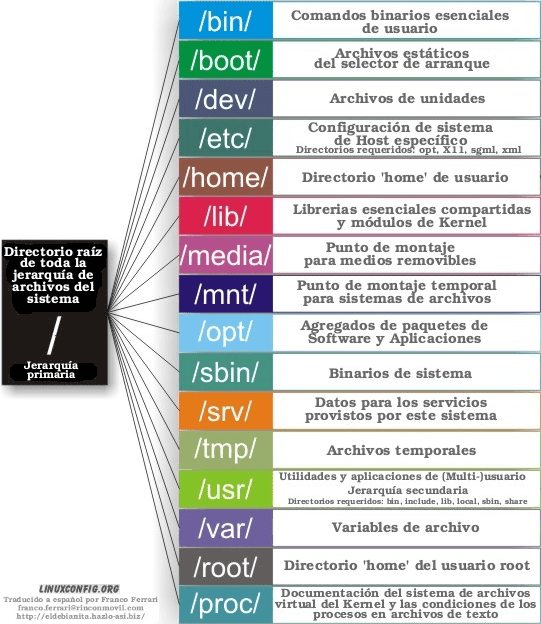
A continuación, vamos a mencionar la estructura de directorios que los Linux deben de tener:
Estáticos. Son todos aquellos directorios que sus archivos no son modificados, en ellos encontraremos directorios como de comandos, instalaciones, etc.
Dinámicos. Son todos aquellos directorios que constantemente cambian sus archivos (modificados), como ejemplo logs de sistemas, de aplicaciones, etc.
Normal
021
false
false
falseES-MX
X-NONE
X-NONE/* Style Definitions */
table.MsoNormalTable
{mso-style-name:”Tabla normal”;
mso-tstyle-rowband-size:0;
mso-tstyle-colband-size:0;
mso-style-noshow:yes;
mso-style-priority:99;
mso-style-parent:””;
mso-padding-alt:0cm 5.4pt 0cm 5.4pt;
mso-para-margin-top:0cm;
mso-para-margin-right:0cm;
mso-para-margin-bottom:8.0pt;
mso-para-margin-left:0cm;
line-height:107%;
mso-pagination:widow-orphan;
font-size:11.0pt;
font-family:”Calibri”,sans-serif;
mso-ascii-font-family:Calibri;
mso-ascii-theme-font:minor-latin;
mso-hansi-font-family:Calibri;
mso-hansi-theme-font:minor-latin;
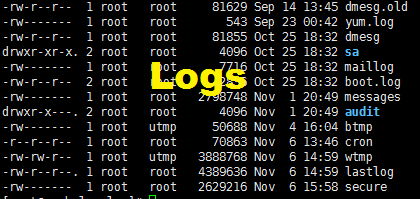
mso-fareast-language:EN-US;}/var/log/messages (f): Este log registra todos los enviados
por el Sistema Operativo (ssh, procesos, ftp, kernel, etc.)/var/log/maillog (f): Este log guarda la información de mail
que tengamos configurado en nuestro servidor./var/log/boot.log (f): En este log se guarda la información
de boot del servidor, cada que nuestro servidor se reinicia y los distintos
demonios se levantan, ahí podemos consultar lo que se haya levantado./var/log/btmp (f) y /var/log/wtmp (f): En ellos se guarda la
información de logueos y deslogueos de nuestro Sistema Operativo./var/log/yum.log (f): Log de la herramienta yum, en el cual
registra errores, actualizaciones e instalaciones que se realicen con el
comando yum./var/log/cron (f): Se visualiza los crons ejecutados, la
hora, al usuario que pertenece y puede visualizar también si lo puesto en el
cron si lanza shells, etc./var/log/audit (d): Este directorio guarda los logs de
audit, en el caso que lo tengamos configurado en nuestro servidor, el archivo a
revisar es audit.log
NAME top
dmesg - print or control the kernel ring bufferSYNOPSIS top
       dmesg [options]

       dmesg --clear
       dmesg --read-clear [options]
       dmesg --console-level level
       dmesg --console-on
       dmesg --console-off
DESCRIPTION top
       dmesg is used to examine or control the kernel ring buffer.

       The default action is to display all messages from the kernel ring
       buffer.
¿Qué comandos puedo usar para revisar los logs?
- cat
- more
- tail
- head
- split
- grep
- wc
- sort
- uniq
- less
Por si algunos desconocen lo que hace cada comando, coloco su información:
CAT(1) User Commands CAT(1)NAME top
cat - concatenate files and print on the standard outputSYNOPSIS top
cat [OPTION]... [FILE]...DESCRIPTION top
       Concatenate FILE(s) to standard output.

       With no FILE, or when FILE is -, read standard input.
MORE(1) User Commands MORE(1)NAME top
more - file perusal filter for crt viewingSYNOPSIS top
more [options] file...DESCRIPTION top
       more is a filter for paging through text one screenful at a time.
       This version is especially primitive.  Users should realize that
       less(1) provides more(1) emulation plus extensive enhancements.
TAIL(1) User Commands TAIL(1)NAME top
tail - output the last part of filesSYNOPSIS top
tail [OPTION]... [FILE]...DESCRIPTION top
       Print the last 10 lines of each FILE to standard output.  With more
       than one FILE, precede each with a header giving the file name.

       With no FILE, or when FILE is -, read standard input.

       Mandatory arguments to long options are mandatory for short options
       too.
HEAD(1) User Commands HEAD(1)NAME top
head - output the first part of filesSYNOPSIS top
head [OPTION]... [FILE]...DESCRIPTION top
       Print the first 10 lines of each FILE to standard output.  With more
       than one FILE, precede each with a header giving the file name.

       With no FILE, or when FILE is -, read standard input.

       Mandatory arguments to long options are mandatory for short options
       too.
SPLIT(1) User Commands SPLIT(1)NAME top
split - split a file into piecesSYNOPSIS top
split [OPTION]... [FILE [PREFIX]]DESCRIPTION top
       Output pieces of FILE to PREFIXaa, PREFIXab, ...; default size is
       1000 lines, and default PREFIX is 'x'.

       With no FILE, or when FILE is -, read standard input.

       Mandatory arguments to long options are mandatory for short options
       too.
GREP(1) General Commands Manual GREP(1)NAME top
grep, egrep, fgrep - print lines matching a patternSYNOPSIS top
       grep [OPTIONS] PATTERN [FILE...]
       grep [OPTIONS] [-e PATTERN | -f FILE] [FILE...]
DESCRIPTION top
       grep searches the named input FILEs for lines containing a match to
       the given PATTERN.  If no files are specified, or if the file “-” is
       given, grep searches standard input.  By default, grep prints the
       matching lines.

       In addition, the variant programs egrep and fgrep are the same as
       grep -E and grep -F, respectively.  These variants are deprecated,
       but are provided for backward compatibility.
WC(1) User Commands WC(1)NAME top
wc - print newline, word, and byte counts for each fileSYNOPSIS top
       wc [OPTION]... [FILE]...
       wc [OPTION]... --files0-from=F
DESCRIPTION top
       Print newline, word, and byte counts for each FILE, and a total line
       if more than one FILE is specified.  A word is a non-zero-length
       sequence of characters delimited by white space.

       With no FILE, or when FILE is -, read standard input.

       The options below may be used to select which counts are printed,
       always in the following order: newline, word, character, byte,
       maximum line length.
SORT(1) User Commands SORT(1)NAME top
sort - sort lines of text filesSYNOPSIS top
       sort [OPTION]... [FILE]...
       sort [OPTION]... --files0-from=F
DESCRIPTION top
       Write sorted concatenation of all FILE(s) to standard output.

       With no FILE, or when FILE is -, read standard input.
UNIQ(1) User Commands UNIQ(1)NAME top
uniq - report or omit repeated linesSYNOPSIS top
uniq [OPTION]... [INPUT [OUTPUT]]DESCRIPTION top
       Filter adjacent matching lines from INPUT (or standard input),
       writing to OUTPUT (or standard output).

       With no options, matching lines are merged to the first occurrence.
LESS(1) General Commands Manual LESS(1)NAME top
less - opposite of moreSYNOPSIS top
       less -?
       less --help
       less -V
       less --version
       less [-[+]aABcCdeEfFgGiIJKLmMnNqQrRsSuUVwWX~]
            [-b space] [-h lines] [-j line] [-k keyfile]
            [-{oO} logfile] [-p pattern] [-P prompt] [-t tag]
            [-T tagsfile] [-x tab,...] [-y lines] [-[z] lines]
            [-# shift] [+[+]cmd] [--] [filename]...
       (See the OPTIONS section for alternate option syntax with long option
       names.)
DESCRIPTION top
       Less is a program similar to more (1), but which allows backward
       movement in the file as well as forward movement.  Also, less does
       not have to read the entire input file before starting, so with large
       input files it starts up faster than text editors like vi (1).  Less
       uses termcap (or terminfo on some systems), so it can run on a
       variety of terminals.  There is even limited support for hardcopy
       terminals.  (On a hardcopy terminal, lines which should be printed at
       the top of the screen are prefixed with a caret.)

       Commands are based on both more and vi.  Commands may be preceded by
       a decimal number, called N in the descriptions below.  The number is
       used by some commands, as indicated.
Bytes.









Publicar comentario